- 1. The real fear: a mistake that keeps going
- 2. Wrong channel: the channel_title check
- 3. Duplicate uploads: the upload_result.json stop
- 4. Accidentally public: private is the default
- 5. Catching problems before anything is sent: –dry-run
- 6. What you still check yourself: limits and YouTube Studio
- 7. Summary and what to read next
1. The real fear: a mistake that keeps going
When you upload by hand, you watch the screen the whole time, so you tend to catch a mistake halfway through. Switch to a workflow where one command does the upload, and you lose some of those chances to notice. That is a perfectly reasonable thing to worry about, and it stops a lot of people from automating at all.
The worry usually comes down to three things:
- Posting to the wrong channel, for example your hobby channel instead of your side-hustle channel
- Posting the same video twice
- Having a video go public before you have checked it
The reference code in the “YouTube Auto-Upload Builder Pack for Solo Creators” includes guards aimed at these three. This article goes through four of them, with the exact messages the script prints.
To be clear from the start: none of these is a promise that mistakes cannot happen. They are mechanisms that give you more chances to notice one. Each section below ends with the situations in which the guard does not help, taken from how the script is actually written.
2. Wrong channel: the channel_title check
The file that holds your upload details (video_meta.md) has a line for the name of the channel you mean to upload to.
channel_title: "Weekend Camp Notes"
When you run the upload command, the script asks YouTube for the name of the channel you are currently signed in to, before it sends the video. If the name does not match, it stops like this:
Uploading to channel: Sample Gaming Channel
[ABORTED] This is not the expected channel (expected: Weekend Camp Notes / actual: Sample Gaming Channel). Upload cancelled.
At this point no video has been uploaded. If you signed in with a different channel, you delete secrets/token.json and sign in again. A token is the saved permit that says “this program may upload to this channel”; it is created at your first sign-in. Deleting it makes the script ask you to choose the channel again in the browser.
Where this guard stops
- If you delete the
channel_titleline, the check is skipped. The pre-flight screen then showsChannel check : off. The script still prints theUploading to channel:line, but it continues straight into the upload. - The check compares channel names only. Upper and lower case are ignored, and leading or trailing spaces are trimmed. It does not compare channel IDs, so two channels with the same name would look identical to it.
- If you leave the template’s placeholder value in place, the pre-flight check reports an error. That is there to catch the case where you forgot to fill the line in.
If you run several channels, the troubleshooting guide suggests keeping one project folder per channel, each with its own secrets/ folder, so the sign-ins cannot get mixed up.
3. Duplicate uploads: the upload_result.json stop
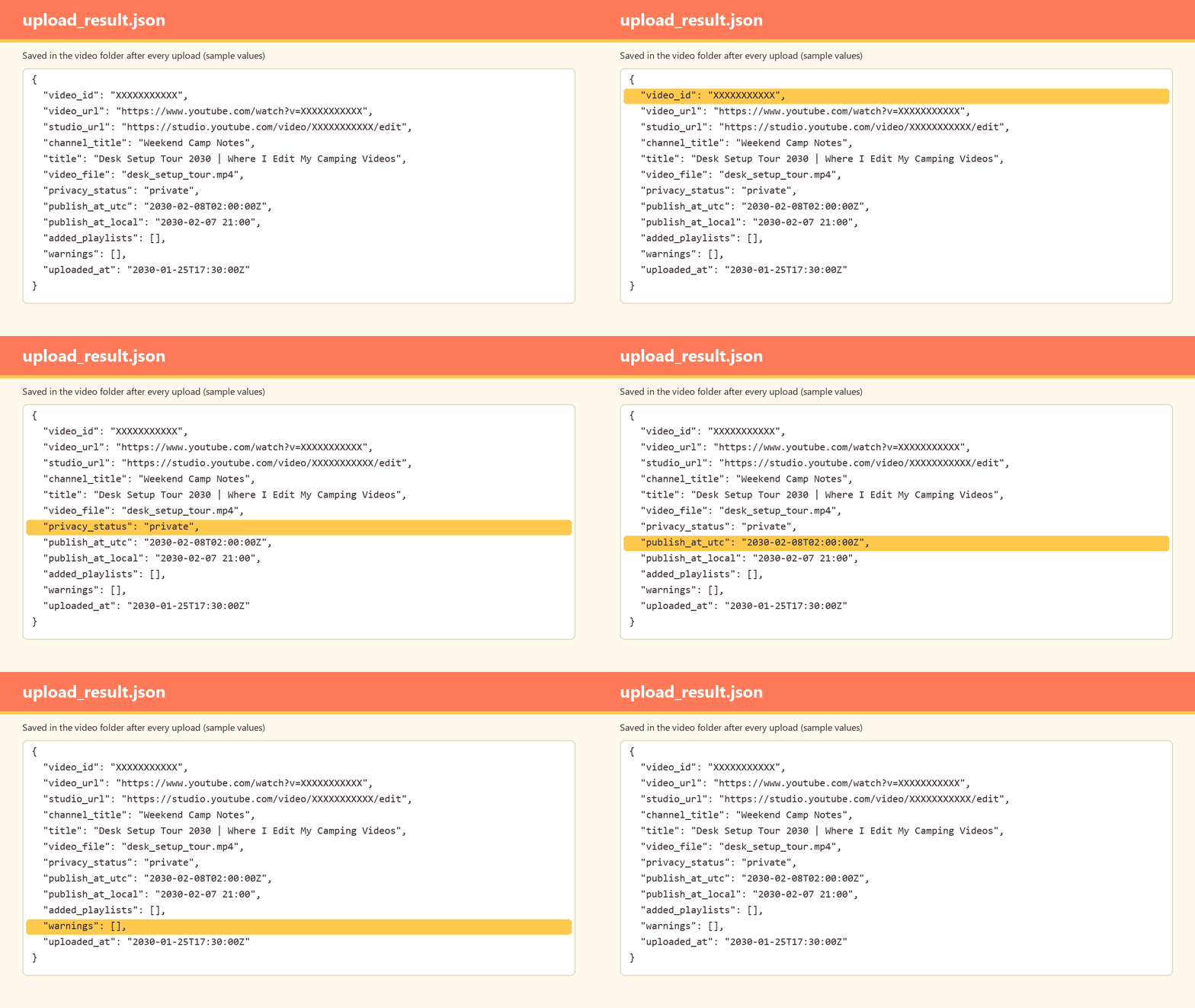
When an upload finishes, a record file named upload_result.json stays in the video folder. It holds the video URL, the YouTube Studio URL, the channel name, the title, the privacy setting, the scheduled time if there was one, any warnings, and the time of the upload.
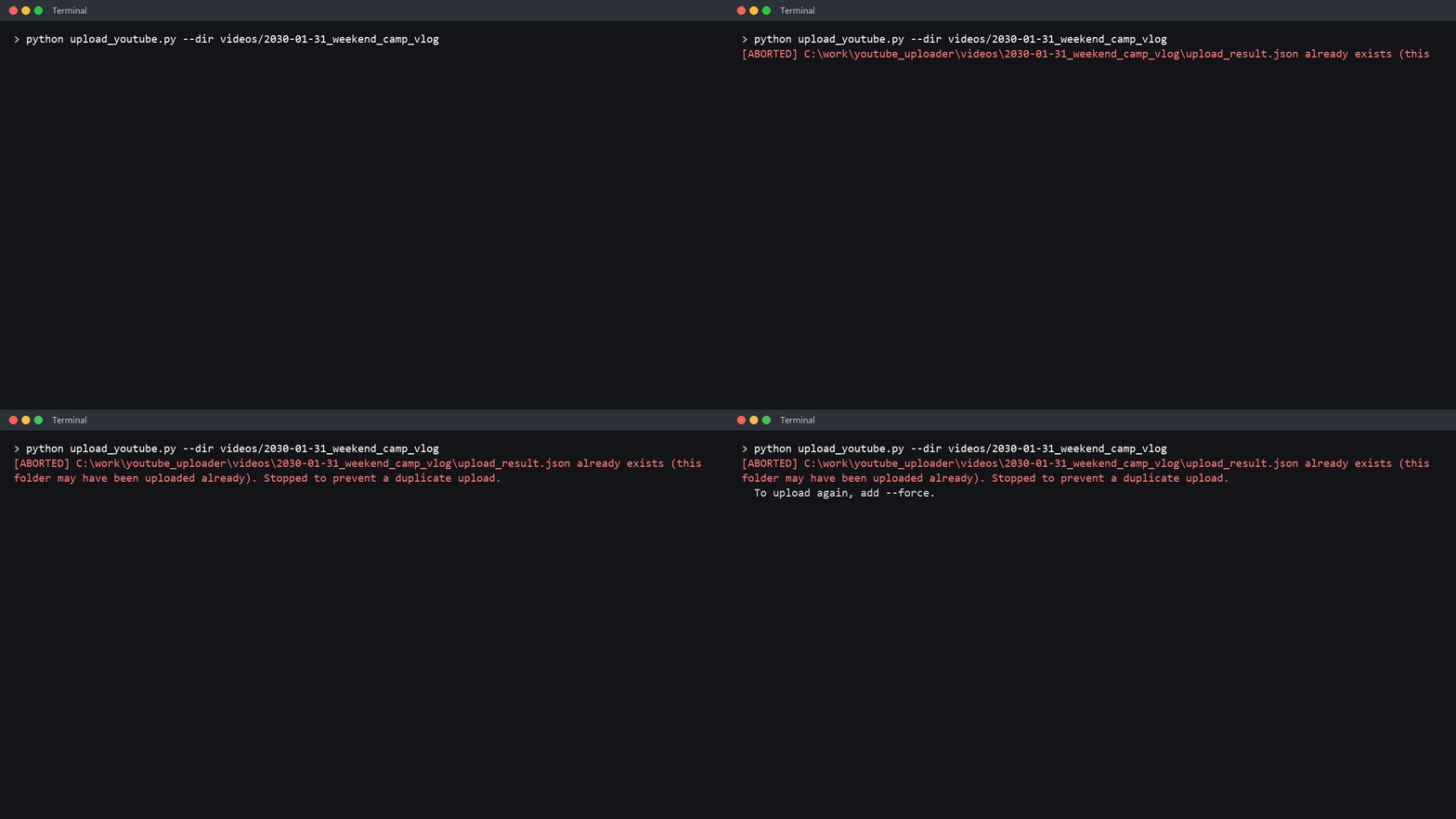
Run the same command again in a folder that holds this record, and the script stops before doing anything else:
[ABORTED] C:\work\youtube_uploader\videos\2030-01-31_weekend_camp_vlog\upload_result.json already exists (this folder may have been uploaded already). Stopped to prevent a duplicate upload.
  To upload again, add --force.
The record is saved right after the video itself has been sent, before the thumbnail and playlist steps. So if a later step fails, running the command again still does not send the video a second time.
Where this guard stops
--forceskips the check and uploads again. That is what the option is for.- The only thing the script looks at is whether the record file exists in that folder. If you delete the file, or put the same video into a different folder, nothing stops the upload.
- If only the thumbnail failed, the video itself is already on YouTube. Running again with
--forcewould create a duplicate, so set the thumbnail in YouTube Studio instead.
4. Accidentally public: private is the default
The template starts with the privacy setting on private.
privacy_status: "private"
Unless you change it yourself to public or unlisted, an uploaded video arrives as private. Scheduling works the same way: the video is uploaded as private and set to go public at the time you gave. You give that time in your computer’s local time, and the pre-flight screen shows both the local time and the UTC time that will be sent. On a computer set to US Eastern time, --schedule "2030-01-31 21:00" prints:
Scheduled for : 2030-01-31 21:00 (UTC-0500) -> publishAt = 2030-02-01T02:00:00Z (UTC)
If you let an AI coding agent such as Claude Code or Cursor do the build, the included master prompt carries 8 safety rules. Among them: the first upload is private, and a real upload needs your explicit approval first.
Where this guard stops
- If you write
privacy_status: "public"and run the command without a schedule, the video is posted as public right away. The script does not stop to ask “are you sure?” at any point. - If you type the wrong date, that date is what gets stored. A time in the past is reported as an error, but the script cannot tell that you meant Friday and wrote Thursday.
- The time follows your computer’s clock and time zone, not where your audience is. Read the
Scheduled forline before you upload. - The safety rules are instructions to an AI. AI output is not the same every time, so read each command the agent proposes before you let it run.
5. Catching problems before anything is sent: –dry-run
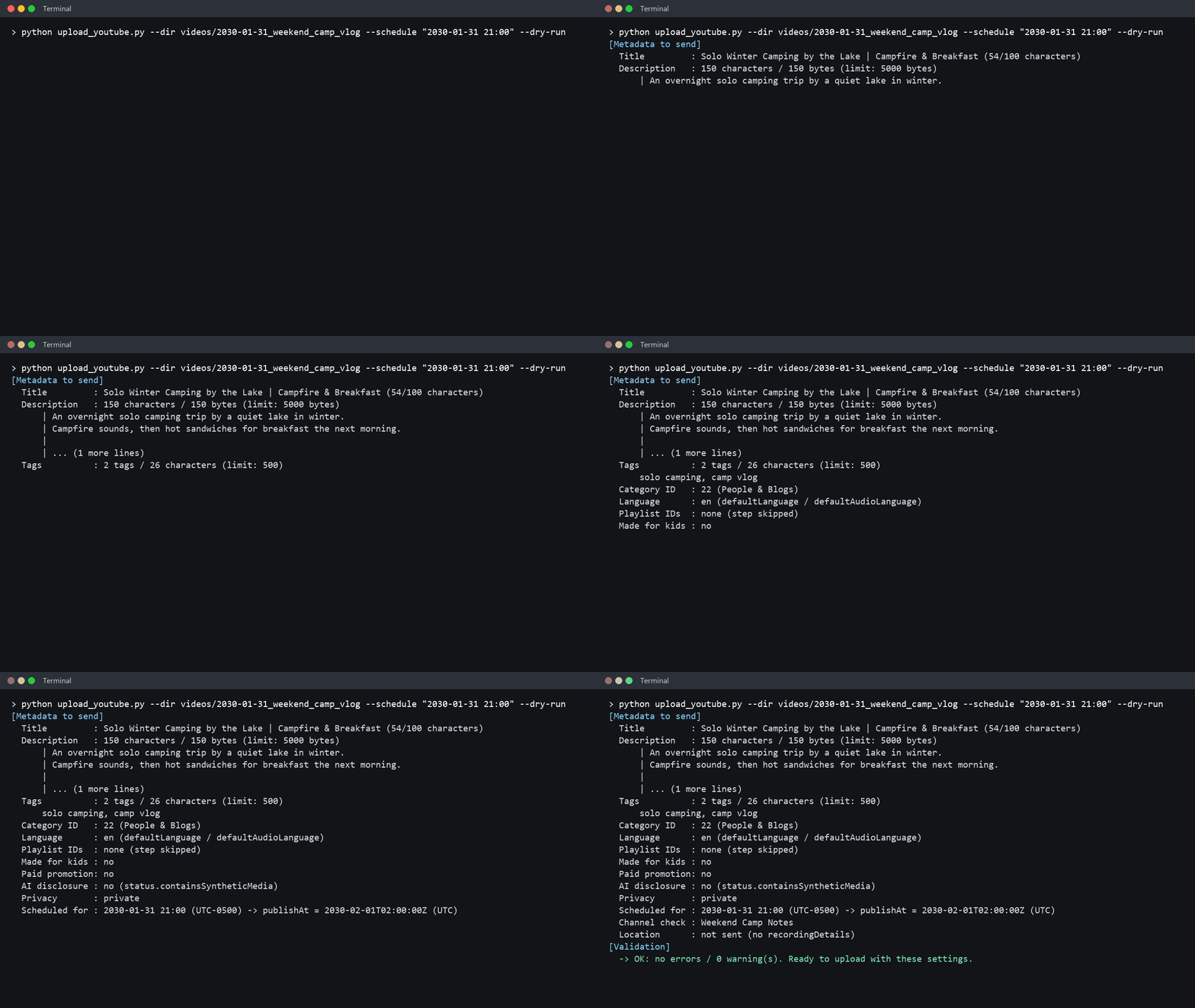
A dry run is a rehearsal. --dry-run checks your files and settings without sending anything to YouTube. It does not call the API, the official door a program uses to operate YouTube, so it uses none of your quota, the daily limit on how much you can use that API.
python upload_youtube.py --dir videos/2030-01-31_weekend_camp_vlog --dry-run
Run it on a template you have not edited yet, and it stops you like this (shortened):
=== DRY RUN (no API calls, no quota used) ===
(output shortened)
[Validation]
  [WARNING] placeholder text is still in the title or description: REPLACE_WITH
  [ERROR] channel_title: still set to the template placeholder. Replace it with your channel name, or delete the line to turn the check off
  -> NG: 1 error(s) / 1 warning(s). Fix them and run again.
NG (no good) means there is at least one error to fix before uploading. After you fix the file, the last line changes to:
-> OK: no errors / 0 warning(s). Ready to upload with these settings.
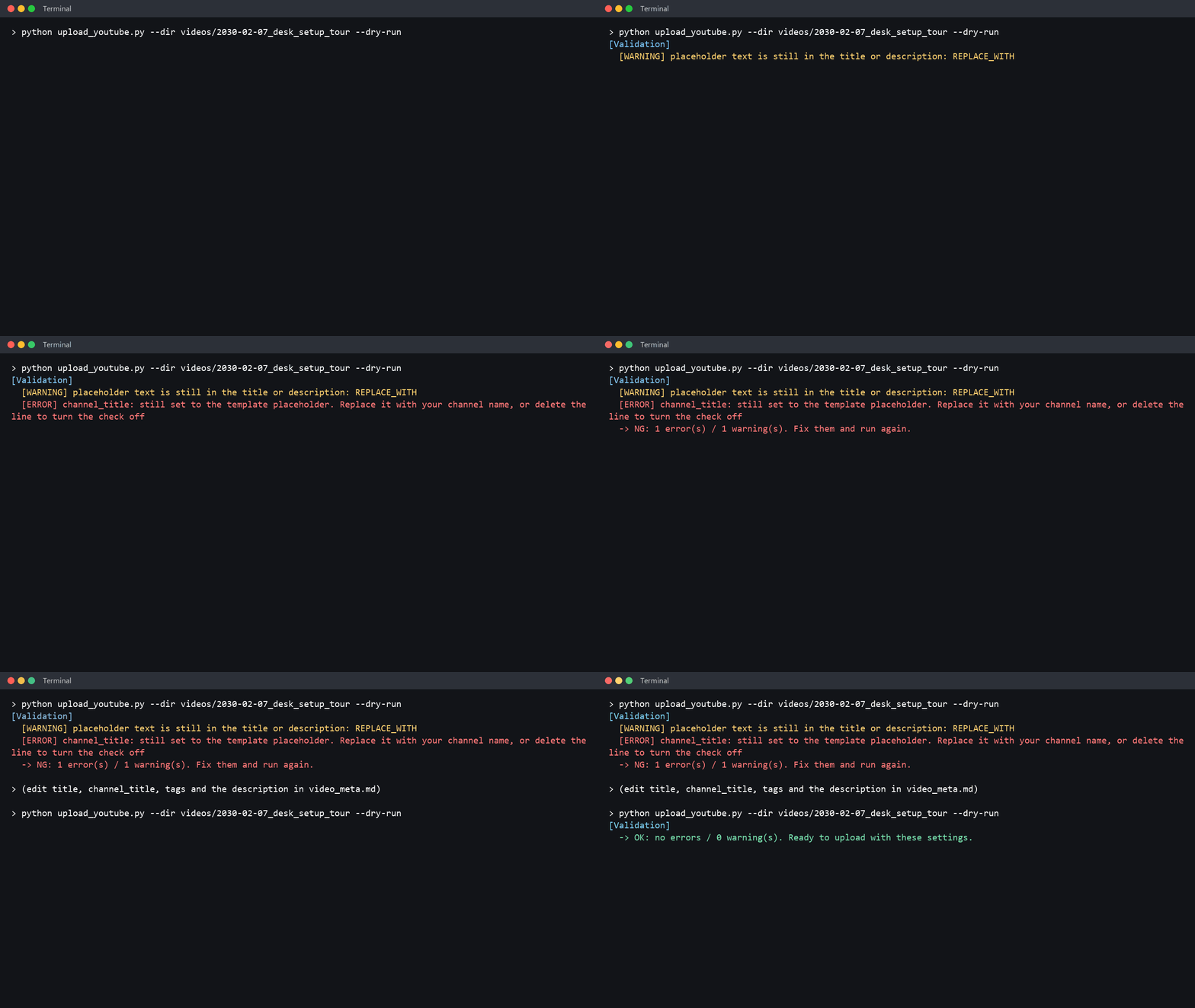
The check covers the title length (100 characters max), the description length (5,000 bytes max), the total length of the tags (500 characters max), whether the video and thumbnail are there, whether a scheduled time is in the past, and more. The screen also lists what will be sent: the title, the privacy setting, the scheduled time, and the channel name used for the channel check. Reading that list with your own eyes, not just looking for the word OK, is the most useful check you can do.
Where this guard stops
- The dry run does not contact YouTube, so it cannot tell you whether you are signed in to the right channel. That comparison happens only in the real run.
- A warning does not block the result. Leftover placeholder text in the title is a warning, so the last line can still say OK. Read the warnings too.
- It checks form, not meaning. A title that fits in 100 characters passes, even if it is the title of last week’s video.
6. What you still check yourself: limits and YouTube Studio
Even after all four guards, some checking stays with you after the upload.
- Settings the script does not set. Automatic place display is a setting the API cannot change, which is why the script prints a reminder when an upload finishes. The script does not change automatic chapters or automatic concepts either (as of November 2026, no matching API field was found). If you film near your home or workplace, check the place setting on your first few uploads.
- AI disclosure and paid promotion. Both flags are sent, but the API may not apply them in every case. The script prints a warning when that happens, and you set them in YouTube Studio.
On top of that, make your first upload a short test video, and keep it private. Look at the title, the thumbnail, and each setting in YouTube Studio before you move on to public or scheduled uploads.
What was checked: the wrong-channel guard (continues on a match, stops on a mismatch) and the duplicate guard were verified through the live YouTube API with private test videos (November 2026, on Windows). --dry-run was verified as well. For scheduling, the scheduled time was accepted and stored; the moment of going public was not observed. Uploading as public with no schedule is described here from reading the code, not from a live test.
7. Summary and what to read next
- Wrong channel: write
channel_title, and the script stops before the upload when the names differ. - Duplicates: a folder that holds
upload_result.jsonis refused, unless you add--force. - Public by accident: the default is private. Whether a video goes public is something you decide by editing the file.
- Looking at the
--dry-runscreen and at YouTube Studio with your own eyes is still needed after the guards are in place.
One more plain fact: the seller is not liable for unintended uploads or publication that result from using the product. Combine the guards with your own review, and run it on your own judgment.
- Overview: YouTube Auto-Upload Builder Pack: One Folder, One Command, Scheduled
- The folder rule and how to use
--dry-run: One Folder, One Video: Catch Upload Mistakes With a Dry Run - The master prompt and keeping the AI away from your credentials: Build a YouTube Uploader With Claude Code, Keep Your Keys Private
- What the API can and cannot set, and the current quota rules: What the YouTube API Sets Automatically, What It Doesn’t, and Quota
- If your uploads keep getting postponed: Video Done, Upload Postponed? Break the YouTube Upload Chore Down
- If the terminal and Google Cloud make you nervous: Nervous About the Terminal and Google Cloud? What Setup Involves
The product page is below. It is a builder pack with no support, a personal license for one person, $19 one-time.
Get it on Gumroad: https://ainavi.gumroad.com/l/youtube-auto-upload-builder-pack-solo
YouTube is a trademark of Google LLC. This product is not provided, endorsed or sponsored by Google LLC or YouTube.
コメント