This article walks through the basic idea behind upload_youtube.py, the reference code in the YouTube Auto-Upload Builder Pack for Teams: one folder per video, a plain-text metadata file, and a --dry-run check that finds problems before anything is sent. Every console message quoted below is copied from the English reference code.
- 1. The same typing and the same checking, every single upload
- 2. The “one folder, one video” rule
- 3. video_meta.md: settings on top, description below
- 4. Create the skeleton with –init-meta
- 5. Find problems before you upload with –dry-run
- 6. What the dry run catches
- 7. What has been tested, and what to know before you start
- 8. Summary and related articles
1. The same typing and the same checking, every single upload
Typing a title, description, tags, thumbnail and schedule into YouTube Studio by hand takes time. It also carries two costs that are easier to miss.
The first is that what you typed lives only in the browser and in one person’s memory. When a colleague asks which tags went on last month’s webinar video, or has to cover uploads while the usual owner is on vacation, there is nothing to hand over except “look at how I did the last one.” That is key-person dependency, and it gets worse with every channel you add.
The second is that mistakes tend to surface after the upload. A title that runs too long, a thumbnail nobody attached, a schedule set to a date that has already passed: in the browser, the only way to find these is to reread every field, every time.
The reference code deals with both in the same way. You write the upload settings into a file, and a program validates that file before anything is sent.
One point to be clear about up front: this pack is not a finished app or a hosted service. It is a build kit, a foundation for setting up this workflow on your own computers. You are expected to finish the build and adjust it to your environment yourself, using the included master prompt with an AI coding agent such as Claude Code or Cursor.
2. The “one folder, one video” rule
The reference code works on a simple convention. Each video gets its own folder, and that folder holds the video file, the thumbnail and the metadata, meaning the title, description and other upload settings.
videos/
├── 2030-01-31_product_demo/
│   ├── main_video.mp4
│   ├── thumbnail.jpg
│   └── video_meta.md
└── 2030-02-07_webinar_highlights/
    ├── main_video.mp4
    ├── thumbnail.png
    └── video_meta.md
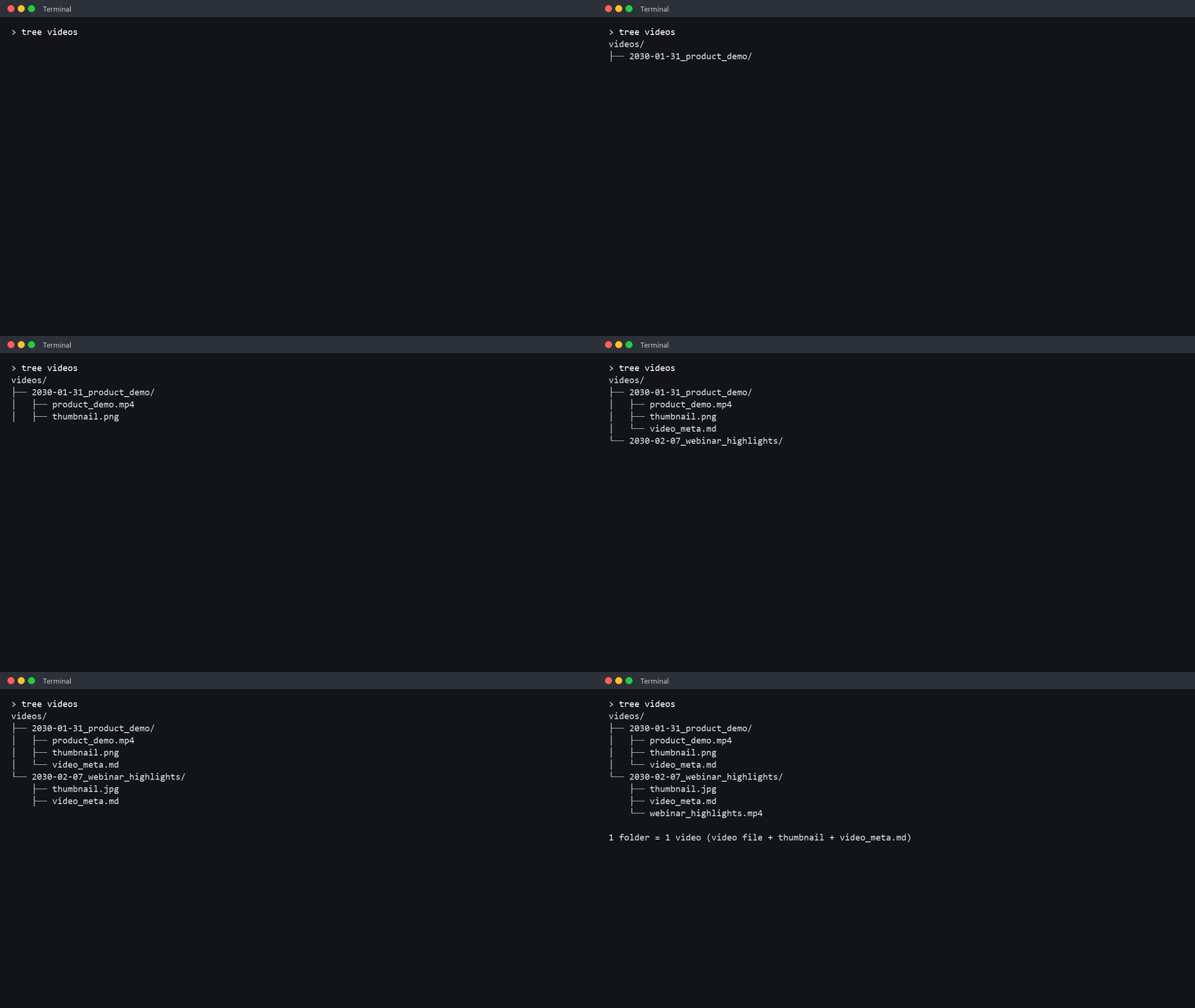
When you run the script, you point it at one folder with --dir. If the folder holds exactly one video file, the script finds it without being told the file name. It looks for six extensions: .mp4, .m4v, .mov, .webm, .mkv and .avi. If the folder holds more than one video, for example a main video and a Shorts cut, the script stops and asks you to pick one with the video_file setting.
The benefit of the convention is that everything about one upload sits in one place. A reviewer can open a single folder and see the video, the image and the text that will go out together.
After a successful upload, the script saves a result file named upload_result.json in the same folder. It records the title, the channel name, the privacy setting, the scheduled time if there is one, any warnings, and when the upload happened. If you run the script again in a folder that already contains this file, it aborts to prevent a duplicate upload. You have to add --force to upload the same folder again on purpose.
3. video_meta.md: settings on top, description below
video_meta.md is a single file with two parts. Everything between the first --- line and the second --- line is settings, written in YAML, a plain “key: value” text format. Everything below the second --- is sent to YouTube as the video description, exactly as written.
---
title: "Product Demo: The Basics in 3 Minutes"
channel_title: "Sample Corp Official Channel"
category_id: "28"
language: "en"
privacy_status: "private"
timezone: "UTC"
tags:
  - "product demo"
  - "how to"
---
A three-minute demo of the basic workflow in our new product.

Chapters
00:00 Intro
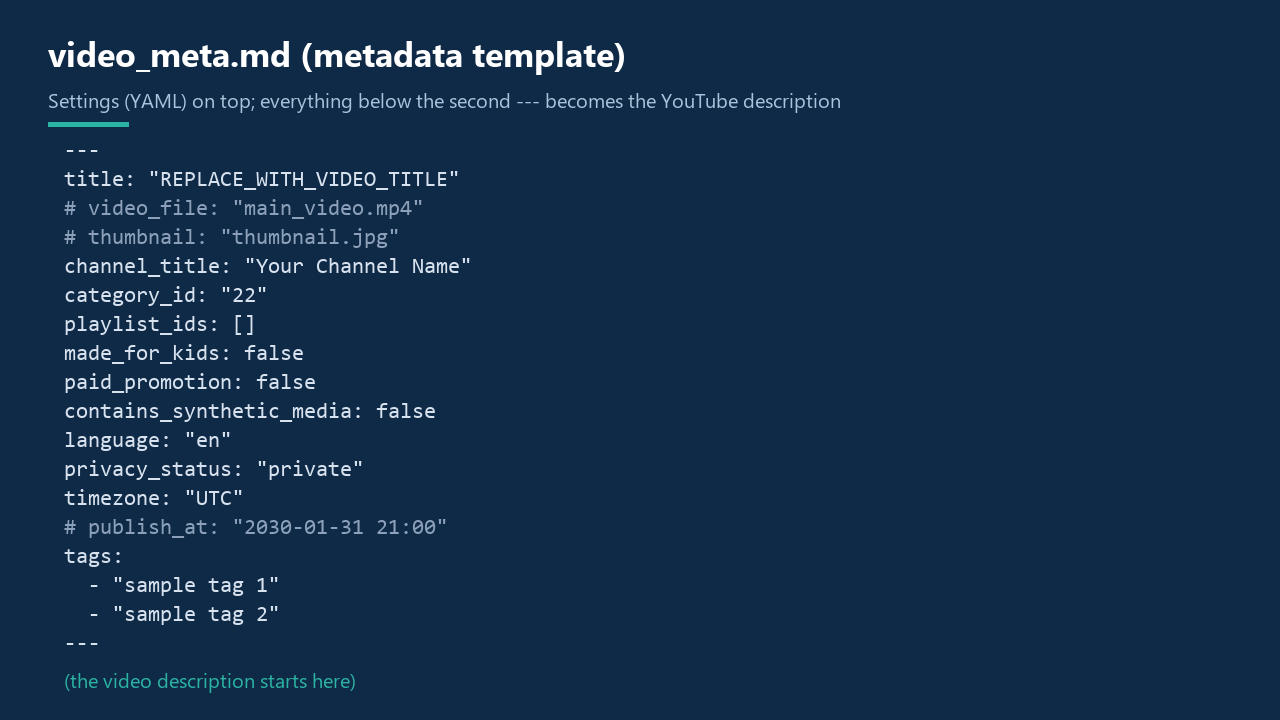
The channel name in this example is fictional. The file accepts 14 settings, and only title is required. Anything you leave out falls back to a default. In the English build, the defaults are private for the privacy setting, en for the language, UTC for the time zone and category 22 (People & Blogs). The example above overrides the category with 28 (Science & Technology).
The description keeps its line breaks, chapter list and hashtags exactly as you type them, so what you see in the file is what viewers will see under the video.
One setting deserves a note. channel_title is a guard against uploading to the wrong channel. During a real upload, the script looks up the name of the signed-in channel and aborts before sending anything if it differs from this value. The comparison ignores upper and lower case. If you do not want the guard, delete the line.
Because the file is plain text, it can sit on a shared drive or in version control, be reviewed by a second person, and be copied as the starting point for the next video.
4. Create the skeleton with –init-meta
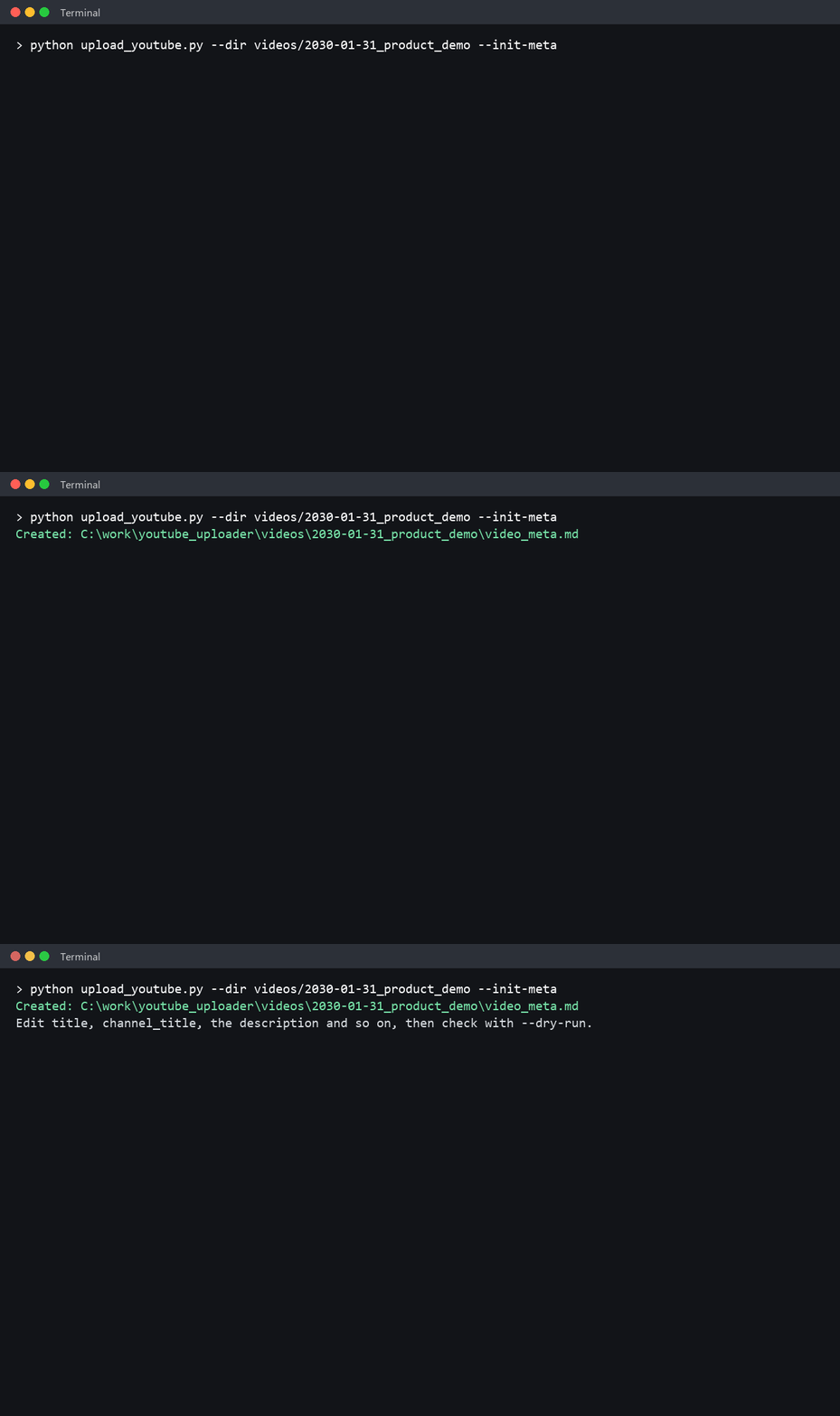
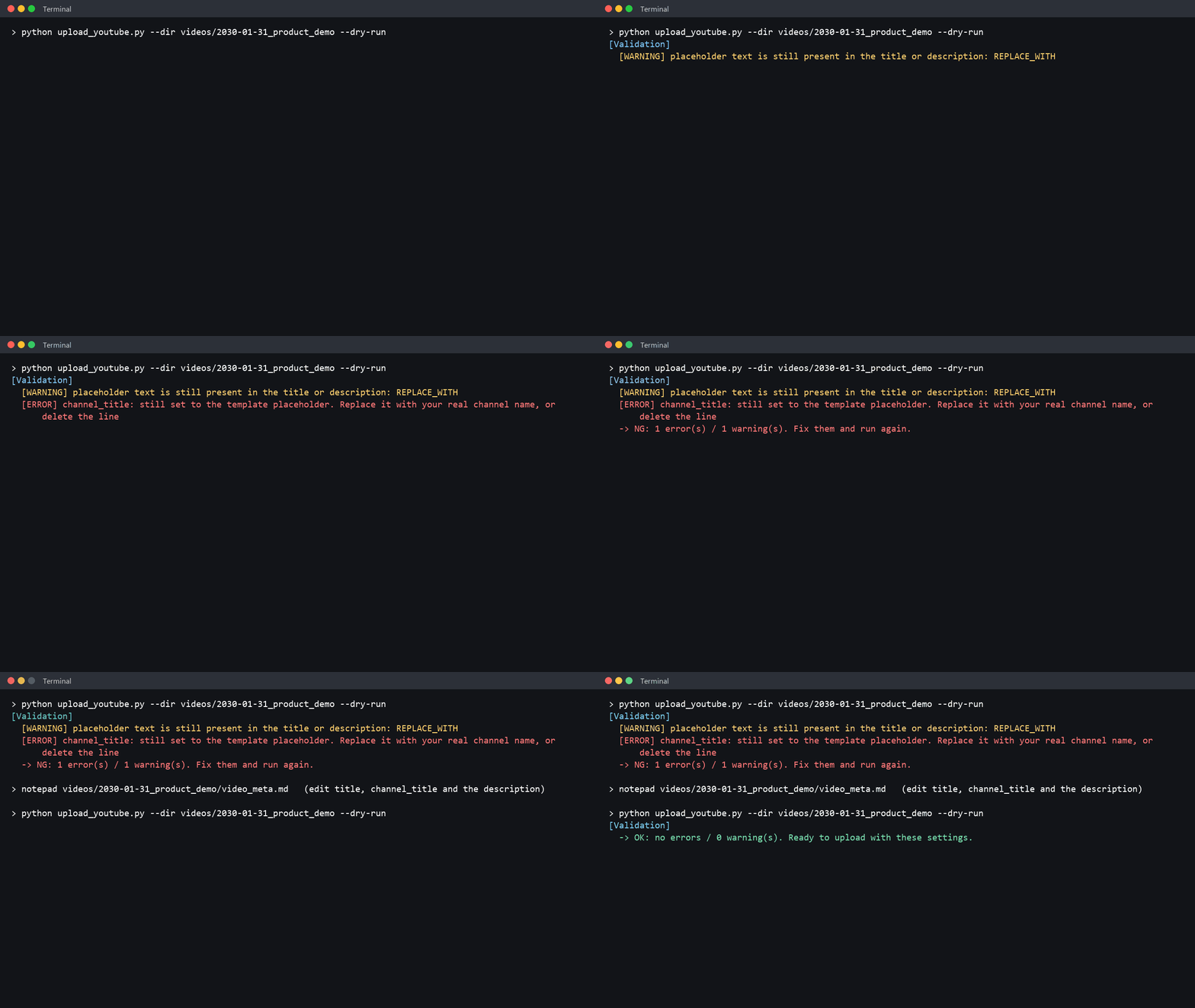
You do not have to write video_meta.md from scratch. Point the script at a video folder with --init-meta, and it copies a commented template into that folder.
python upload_youtube.py --dir ./videos/2030-01-31_product_demo --init-meta
The console prints Created: followed by the location of the new file, and then this line:
Edit title, channel_title, the description and so on, then check with --dry-run.
If the folder already has a video_meta.md, the script prints a message ending in already exists, so it was not overwritten. and leaves your half-written file alone.
The skeleton has a comment above every key explaining what it does and which values are allowed. It also contains placeholder values such as REPLACE_WITH_VIDEO_TITLE and Your Channel Name. The next step is designed to catch those if you forget to change them.
5. Find problems before you upload with –dry-run
Once you have edited the skeleton, run the script with --dry-run before the real upload. A dry run is a rehearsal: the script shows what it would send and what is wrong with it, without actually sending anything.
python upload_youtube.py --dir ./videos/2030-01-31_product_demo --dry-run
A dry run does not call the API, the interface that lets software operate YouTube without a person clicking through the website. So no video is uploaded, and no quota is used. Quota is the daily allowance of API usage that Google gives each project. You can repeat a dry run as often as you like.
The output starts with === DRY RUN (no API calls, no quota used) === and then prints four sections in order: [Files], [Credentials] (existence check only; contents are never shown), [Metadata to send] and [Validation].
If you run it on a skeleton you have barely edited, the last section looks like this:
[Validation]
  [WARNING] placeholder text is still present in the title or description: REPLACE_WITH
  [ERROR] channel_title: still set to the template placeholder. Replace it with your real channel name, or delete the line
  -> NG: 1 error(s) / 1 warning(s). Fix them and run again.
“NG” is the script’s label for “no good,” a failed check. Fix what it points at, run the same command again, and when you see the following line, the folder is ready:
-> OK: no errors / 0 warning(s). Ready to upload with these settings.
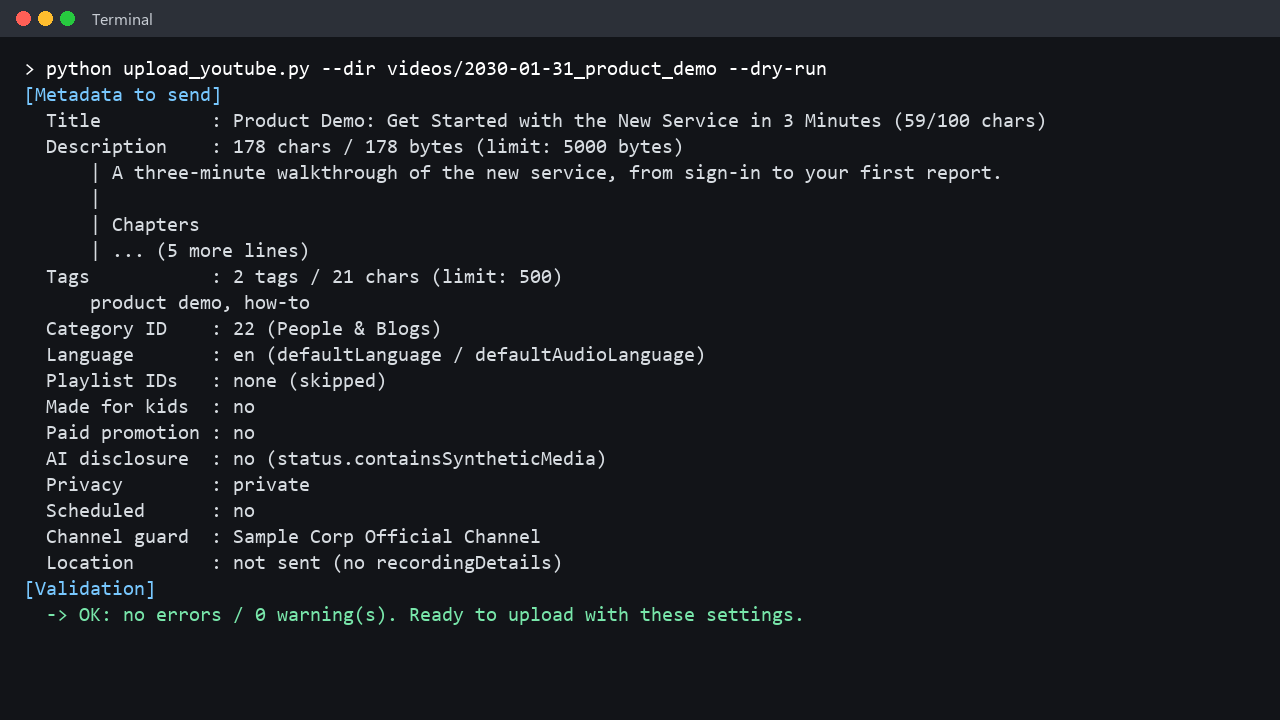
The [Metadata to send] section lists the title with its character count against the limit, the size of the description in characters and bytes, the tags, the category, the language, playlist IDs, the made-for-kids, paid-promotion and AI-disclosure answers, the privacy setting, the schedule and the channel guard. You can read down the list and confirm what is about to go out. The [Credentials] section only reports whether the two credential files are found or missing. It does not print what is inside them.
6. What the dry run catches
Here are typical findings, with the message you see on screen. The “…” stands for the actual value.
| Message on screen | What it means |
|---|---|
title: … characters (limit: 100) |
The title is too long |
description: … bytes (limit: 5000 bytes) |
The description is too long. The limit is counted in bytes, and according to the bundled troubleshooting guide, non-ASCII characters count as 2 to 4 bytes each |
tags: … characters in total (limit: 500) |
The tags add up to too many characters |
video: no video file (…) in the folder |
Nobody put the video file in the folder |
publish_at: … is in the past |
The scheduled time has already passed |
The dry run also reports formatting errors in video_meta.md, such as a missing --- line, and misspelled setting names, with the warning unknown keys were ignored (check the spelling). It rejects < and > in the title, description and tags. And it tells you if the credential file needed for a real upload has not been placed yet.
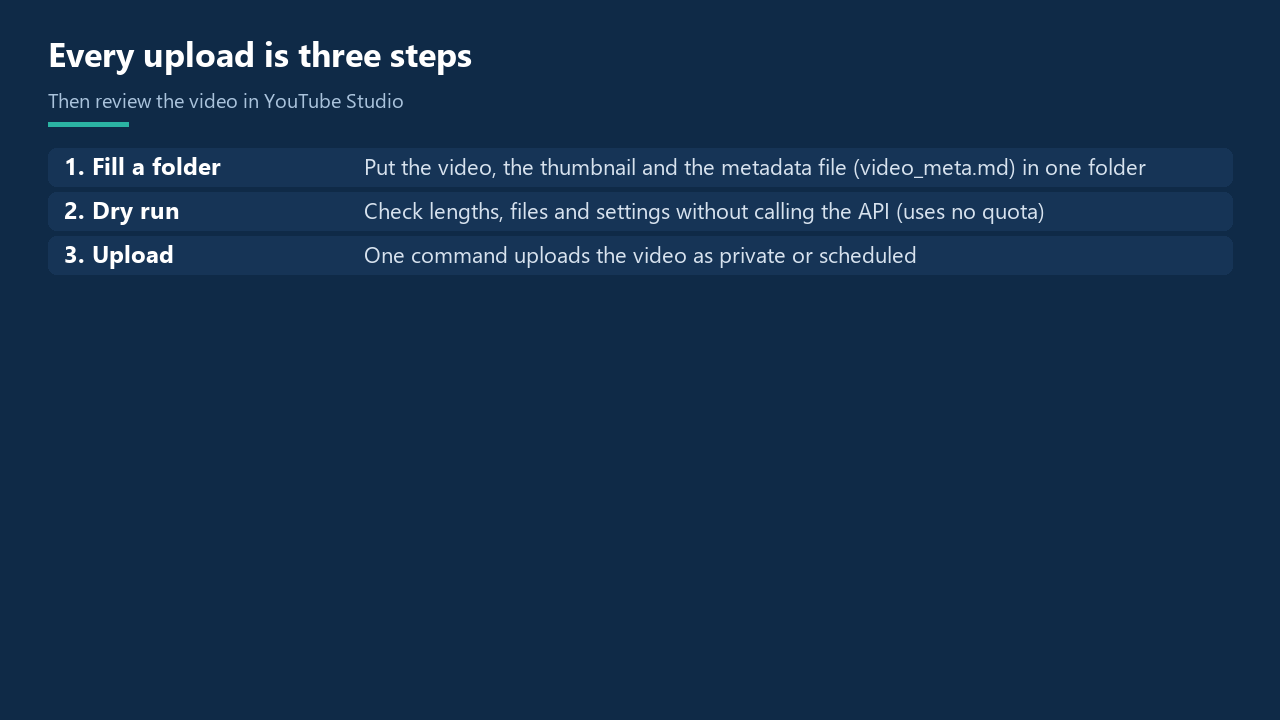
The same validation runs when you leave --dry-run off. If even one error remains, the real run stops before it contacts YouTube, with a line that starts -> Upload aborted because of. So the routine for every video comes down to three steps: put the files in a folder, validate with a dry run, upload.
7. What has been tested, and what to know before you start
The following were verified against the live YouTube API on Windows in November 2026, by uploading private test videos: --init-meta, --dry-run including failure cases, the video upload itself, the title, description, tags and other metadata being applied, and the duplicate-upload guard. Most of those live tests were run with the Japanese-language build of the same code. The English build has the same logic with English messages and defaults. Video formats other than .mp4 and macOS are implemented but have not been tested against the live API.
A dry run has a limit of its own. Because it does not call the API, problems that only appear when you talk to YouTube, such as an expired sign-in, show up during the real run. And some options cannot be set through the API at all, as of November 2026: monetization and ad settings, end screens and cards, and a few others. You review those in YouTube Studio after each upload, and the script prints a reminder and an edit link when it finishes.
The first-time setup includes creating a Google Cloud project and an OAuth client. OAuth is the mechanism that lets an app act on your channel with your permission, without the app ever seeing your password. That setup produces a credential file, which works like a key to your channel. Do not hand it to an AI agent or to any third party. Save it into the designated folder yourself.
The pack is written for people who are comfortable using an AI coding agent and running commands in a terminal. Researching the YouTube Data API, configuring OAuth, writing the upload logic and testing it yourself typically takes a few hours to a full day. Starting from this kit takes about 1 to 2 hours. Both figures are estimates and vary with your environment and experience. API behavior and the wording on Google’s screens can also change after this article was written.
8. Summary and related articles
Write the upload settings into video_meta.md, keep the file in the same folder as the video, and validate with --dry-run before you send. Those two habits turn each upload into a set of files you can review and hand over, and they move the moment you notice a mistake from after the upload to before it.
A good first step costs nothing. Time one upload from start to finish, and note how much of it goes to typing and how much to rereading.
- Overview of the whole kit: YouTube Auto-Upload Builder Pack: What’s Inside and What to Know
- Scheduling, automatic thumbnail compression, playlists and AI disclosure in one file: Schedule YouTube Uploads, Thumbnails and AI Disclosure from One File
- Having Claude Code or Cursor build the workflow from the master prompt: Let Claude Code Build Your YouTube Uploader Without Reading Secrets
- How the kit guards against wrong-channel and duplicate uploads: Afraid of a Wrong Upload? Four Guards in a YouTube Upload Script
The YouTube Auto-Upload Builder Pack for Teams is sold on Gumroad. It is a build kit with no support, unlimited seats within one organization or team, $79 one-time. Separate legal entities each need their own purchase, and the pack may not be redistributed or resold.
Get the pack on Gumroad: https://ainavi.gumroad.com/l/youtube-auto-upload-builder-pack
API details in this article are based on the documentation bundled with the pack, as of November 2026. Specifications and on-screen wording may change.
YouTube is a trademark of Google LLC. This product is not provided, endorsed or sponsored by Google LLC or YouTube.
コメント