When you start looking into automating YouTube uploads, two questions come up quickly. First: of all the things we set in YouTube Studio today, how many can actually be set through the API? Second: how many videos can we upload per day?
A search turns up tutorials for both. The trouble is that the rules of the YouTube Data API v3 have changed more than once, and a plan built on old numbers will not match what you see in practice. This article lays out the situation as of November 2026, based on the setup guide and the troubleshooting guide included in the YouTube Auto-Upload Builder Pack for Teams, a build kit we sell. The rules and the wording on screen can change again, so confirm current values in the official documentation.
- 1. The API Does Not Cover Every Studio Setting
- 2. Settings You Can Send Through the API
- 3. Settings the API Cannot Change, and the Check After Upload
- 4. Current Quota Rules (as of November 2026)
- 5. Reading Older Tutorials With Care
- 6. The Private Lock on Unverified Projects: Removal Announced
- 7. How the Builder Pack Handles This
- 8. Summary
1. The API Does Not Cover Every Studio Setting
An API is the interface a program uses to operate another service. With the YouTube Data API v3, a script can upload a video and set its title without anyone opening a browser.
Not every option on the YouTube Studio screen has an API equivalent, though. If you automate uploads and later notice that a setting was not applied, that may not be a bug in your script. It may simply be how the API works. Knowing in advance where the automation ends and where a human check begins makes it much easier to explain the project internally, get purchase approval if you need it, and design a handover procedure that does not depend on one person’s memory.
2. Settings You Can Send Through the API
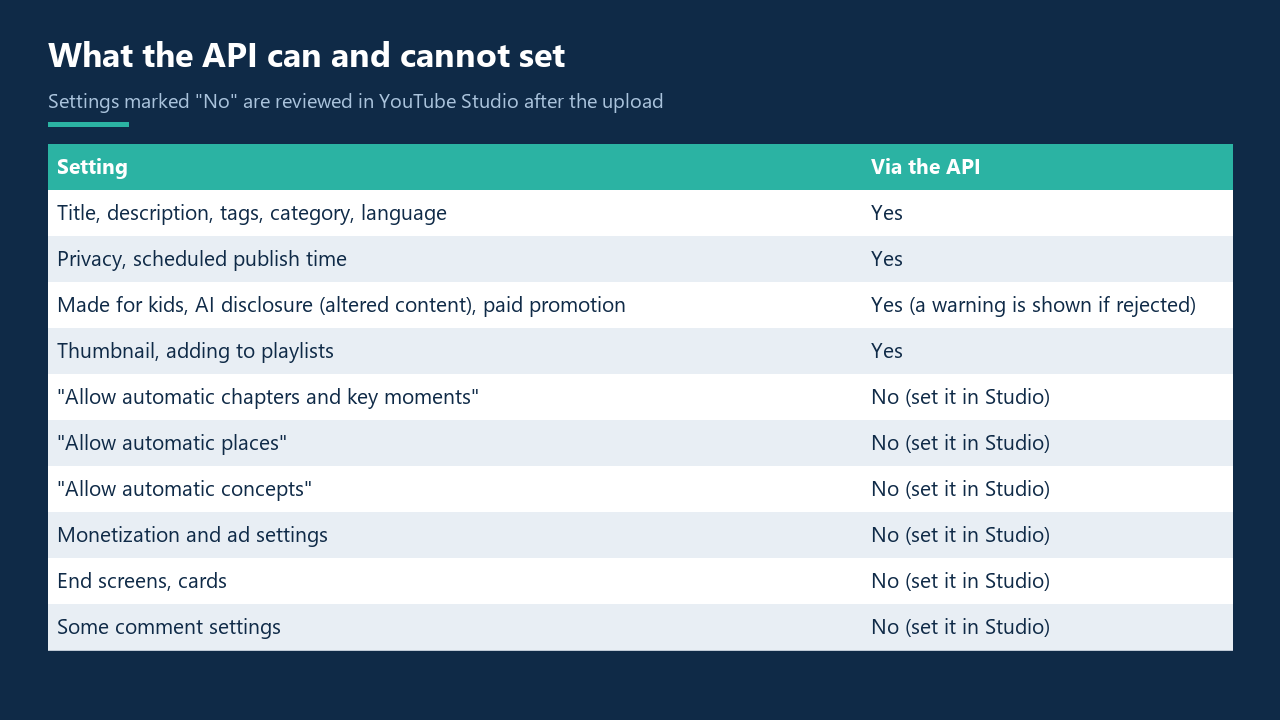
The API covers the basic information about a video: title, description, tags, category and language. It also covers privacy and the scheduled publish time.
Among the declarations, you can set whether the video is made for kids, the AI disclosure (the “Altered content” setting in YouTube Studio) and paid promotion. Depending on the API version and the state of the account, the AI-disclosure and paid-promotion fields are sometimes not accepted. The reference code in the builder pack is written for that case: when one of these fields is rejected, it drops the field, retries the upload exactly once, and warns you that the setting has to be made manually in YouTube Studio. Required disclosures remain the uploader’s responsibility, so a video that produced this warning should be checked in Studio before it goes public.
The thumbnail and adding the video to playlists also go through the API. Custom thumbnails require a phone-verified channel; a channel that is not verified cannot set them through the API either.
3. Settings the API Cannot Change, and the Check After Upload
The following cannot be set through the API. You set them in YouTube Studio.
Three toggles on the video details page cannot be switched from code: “Allow automatic chapters”, “Allow automatic places” and “Allow automatic concepts”. The same goes for monetization and ad settings, end screens, cards and some comment settings.
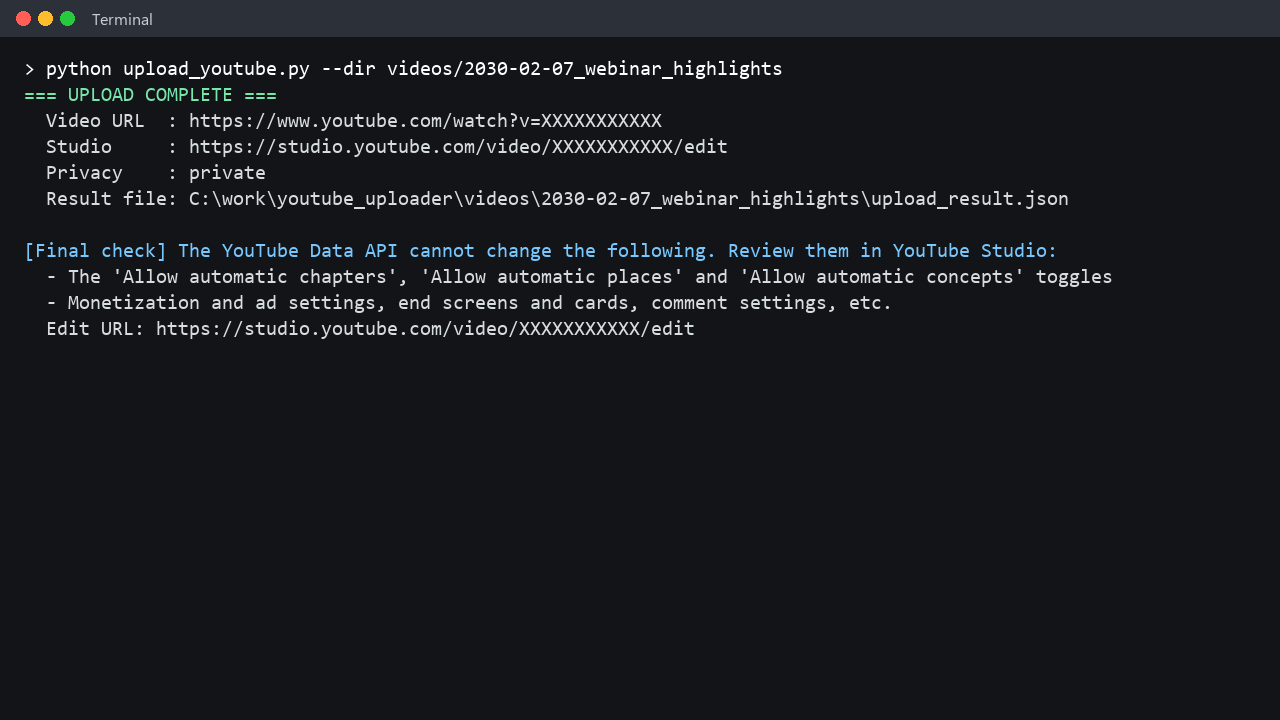
So even with uploads automated, one step remains: open YouTube Studio after the upload and review the video. The reference code, upload_youtube.py, prints a reminder when it finishes. Here is an excerpt, with the video ID replaced by a dummy value:
=== UPLOAD COMPLETE ===
  Video URL  : https://www.youtube.com/watch?v=XXXXXXXXXXX
  Studio     : https://studio.youtube.com/video/XXXXXXXXXXX/edit
  Privacy    : private

[Final check] The YouTube Data API cannot change the following. Review them in YouTube Studio:
  - The 'Allow automatic chapters', 'Allow automatic places' and 'Allow automatic concepts' toggles
  - Monetization and ad settings, end screens and cards, comment settings, etc.
  Edit URL: https://studio.youtube.com/video/XXXXXXXXXXX/edit
For settings you want the same every time, “Upload defaults” under “Settings” in YouTube Studio may let you set a default. How far upload defaults apply to API uploads varies by setting, so check the actual state in Studio for your first few uploads instead of assuming.
One related detail: the reference code does not send location data. A dry run, which is a rehearsal that validates everything without calling the API, shows the line “Location : not sent (no recordingDetails)” among the metadata it plans to send.
4. Current Quota Rules (as of November 2026)
Quota is the daily allowance of API calls. Each Google Cloud project has a limit, and once it is used up, the project cannot call the API again until the reset.
As of November 2026, the official documentation (Quota Calculator) states the following. Video uploads (videos.insert) are counted in their own bucket: the default limit is 100 calls per day, and each call costs 1. All other API methods share a combined default limit of 10,000 units per day. In that second bucket, setting a thumbnail costs 50, adding a video to a playlist costs 50, and getting channel information costs 1. If you set a thumbnail and add the video to one playlist, each video uses about 100 units from the “all other methods” allowance.
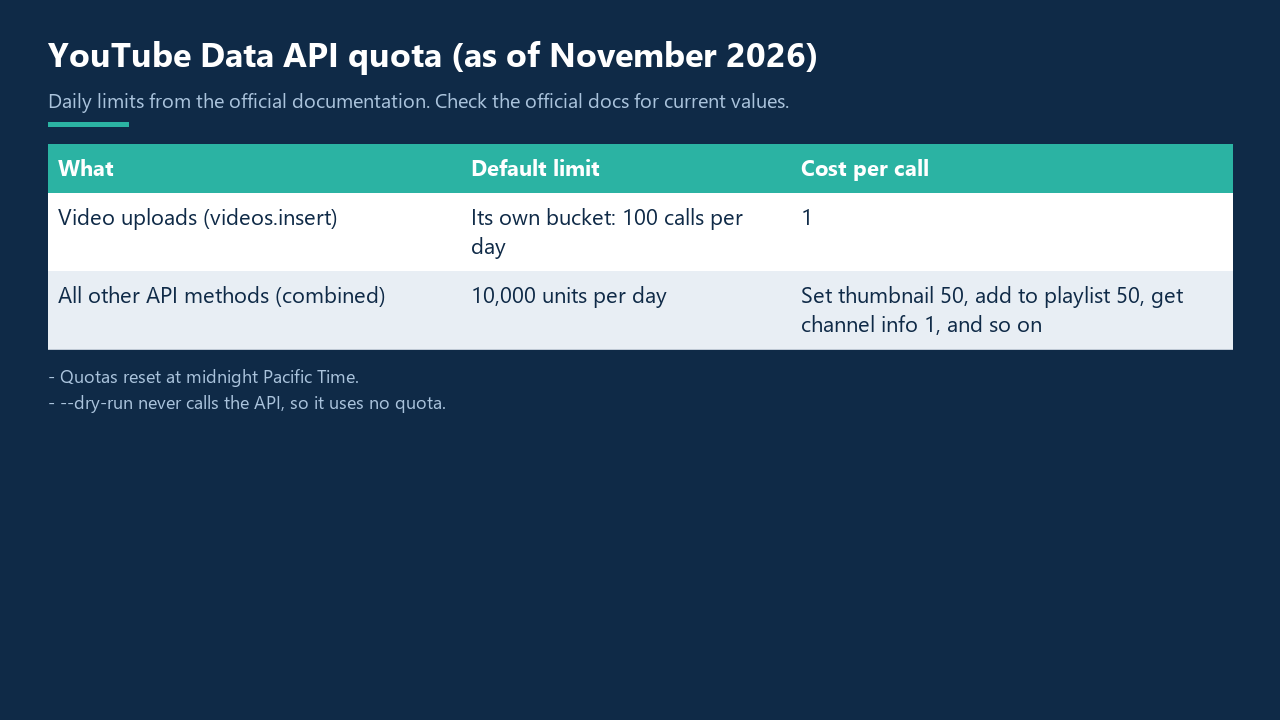
Quotas reset at midnight Pacific Time. When the quota is used up, the API returns HTTP 403 quotaExceeded; you wait for the reset and run the command again. You can check what is left in the Google Cloud Console under “APIs & Services”, then “YouTube Data API v3”, then “Quotas”. If the quota is regularly too small for your volume, you can apply to Google for a quota extension, which is subject to review.
Two cautions belong here.
First, separately from the API quota, each channel has its own daily limit on the number of uploads. That limit is not published and varies with the state of the channel. When a channel reaches it, the API returns uploadLimitExceeded, and the fix is to wait about 24 hours and try again. For an agency or a team running many channels, this means the project-level quota is not the only ceiling to plan around.
Second, quota is per project. Creating multiple projects to get around the limit is prohibited by the YouTube API Services policies.
5. Reading Older Tutorials With Care
The quota system and its costs have changed several times. An upload used to cost about 1,600 units. Articles written under that assumption estimate a far smaller number of uploads per day than the current rules allow, and a team that budgets from those articles may conclude that automation is not worth the effort when the numbers have in fact moved.
When you read a tutorial, check when it was published or last updated, and compare its figures against the official documentation and the “Quotas” page in the Google Cloud Console. Read the figures in this article the same way: they are a snapshot from November 2026.
6. The Private Lock on Unverified Projects: Removal Announced
Visibility is the other topic where outdated information lingers. In the past, videos uploaded from unverified API projects created after July 28, 2020 were locked to private viewing mode. Older tutorials may still say that anything uploaded through the API gets locked to private.
The official YouTube Data API revision history announced the removal of this restriction on November 2, 2026. The older statement no longer matches the current official documentation.
That does not mean visibility can be taken for granted. The official documentation notes that some uploads may default to private depending on the creator’s account settings. YouTube may also restrict a video because of its content or the state of the channel. And the rules may change again. Before going into production, upload one private test video and confirm two things in YouTube Studio: that you can change its visibility, and that a scheduled publish time appears where you expect it.
If a video still cannot be moved out of private, read the message shown in Studio, and check Google’s current official information to see whether your project needs a YouTube API Services compliance audit. If a scheduled video goes public at the wrong time, the cause may be on your side: a timezone value that is not what you intended shifts the schedule.
7. How the Builder Pack Handles This
The builder pack is designed around the rules above.
Settings the API can change go into video_meta.md, a metadata file you place in each video folder. The default privacy is private, and the reference code sends the privacy setting explicitly on each upload. For settings the API cannot change, the completion message shown earlier, with its “Final check” list and the edit URL, sends you to Studio. The edit URL is also saved in a result file in the video folder, so whoever does the review does not need the terminal output.
On quota: because --dry-run does not call the API, validating your settings and files uses no quota. The first line of its output reads “=== DRY RUN (no API calls, no quota used) ===”. You can do your checking in dry runs and keep real runs to a minimum.
On verification: on Windows, private test videos were uploaded through the live API, and the following were confirmed: the upload itself, the metadata applied, the thumbnail (with and without automatic compression), the AI disclosure (Yes and No) and scheduled publishing. Adding videos to playlists is implemented but has not been tested against the live API. The same is true of the retry that runs when the AI-disclosure or paid-promotion field is rejected, and of macOS.
A final note on the scope of the product. It is a foundation you build on and adjust yourself, with no support included, and changes by Google or YouTube may affect how it works in the future.
8. Summary
Through the API you can set the basic information (title, description and so on), privacy and the scheduled publish time, the declarations, the thumbnail and playlists. The three automatic toggles, monetization, end screens and similar options are reviewed in YouTube Studio after the upload. As of November 2026, video uploads have their own allowance of 100 calls per day, and all other methods share 10,000 units per day. These values can change, so do not plan from the numbers in older articles; confirm them in the official documentation.
Related articles:
- Three OAuth pitfalls and how to fix them: 3 OAuth Pitfalls in the YouTube Data API and How to Fix Them
- Scheduled publishing, automatic thumbnail compression, playlists and AI disclosure: Schedule YouTube Uploads, Thumbnails and AI Disclosure from One File
- Full overview of the builder pack (contents, features, what to know before you buy): YouTube Auto-Upload Builder Pack: What’s Inside and What to Know
The YouTube Auto-Upload Builder Pack for Teams is a build kit with no support, unlimited seats within one organization or team, $79 one-time, sold on Gumroad.
YouTube is a trademark of Google LLC. This product is not provided, endorsed or sponsored by Google LLC or YouTube.
コメント